Instagram helps you connect with your friends and relatives easily by letting users follow each other. You can follow users to see their posts, engage with them, and also text them. Instagram recommends accounts of users you may know, mutual friends, accounts of your contacts, or accounts based on your regular activity. These follow suggestions on Instagram help you to discover profiles of users that you may know or follow on Instagram based. However, follow suggestions can sometimes annoy you in your feed with unwanted notifications and suggested posts for the same. Instagram lets you control the follow suggestions on Instagram with a simple setting within the Instagram app or the Instagram website in a browser.
In this article, we provide a guide to turn off follow suggestions on Instagram so that you can experience a clean and clutter-free feed and won’t be annoyed by the notifications regarding the suggested accounts on Instagram in a simple and easy guide.
Why You Keep Seeing Follow Suggestions
Instagram shows follow suggestions on your profile and feed to help users connect and engage with the accounts of the users you may know based on your activity. Instagram uses the following information to show follow suggestions:
- Mutual followers and connected users
- Mobile contacts and synced Meta accounts
- Accounts you follow and engage regularly
- Accounts that interact with your profile
Instagram doesn’t have a direct option to disable the follow suggestions completely; however, you can reduce them to a certain limit by making a few changes to your Instagram profile settings.
The things that you can control to reduce the follow suggestions on Instagram are as follows:
- Avoid your account being suggested on profiles of other users
- Limit suggested posts on your Instagram feed
- Reduce or avoid unwanted follow suggestions on your profile
- Turn off notifications about follow suggestions
Steps to Turn Off Follow Suggestion Notifications
If you are looking to turn off the follow suggestion notifications so that you can enjoy a clutter-free and clean notifications interface on Instagram, you can get it done easily in just a few steps. Follow the steps mentioned below to turn it off:
Step 1: Open the Instagram app on your mobile and log in to your account
Step 2: Tap your profile picture in the bottom-right corner
Step 3: Tap the menu (three lines) in the top-right corner
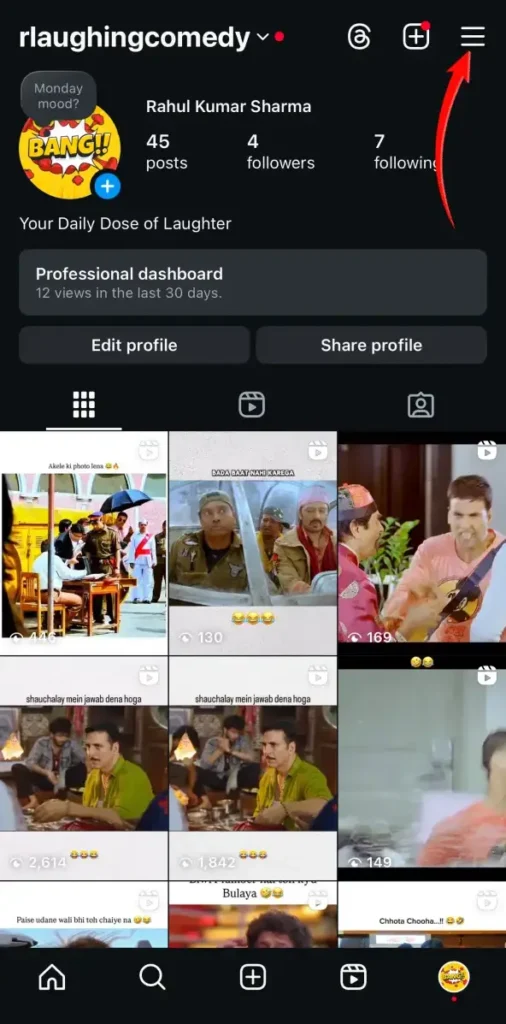
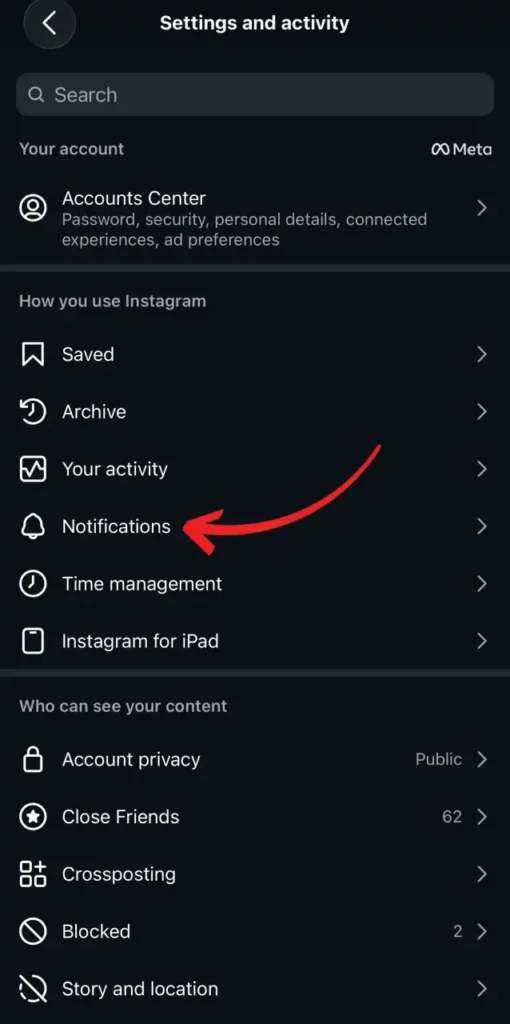
Step 4: Tap on Notifications under How you use Instagram in Settings and Activity
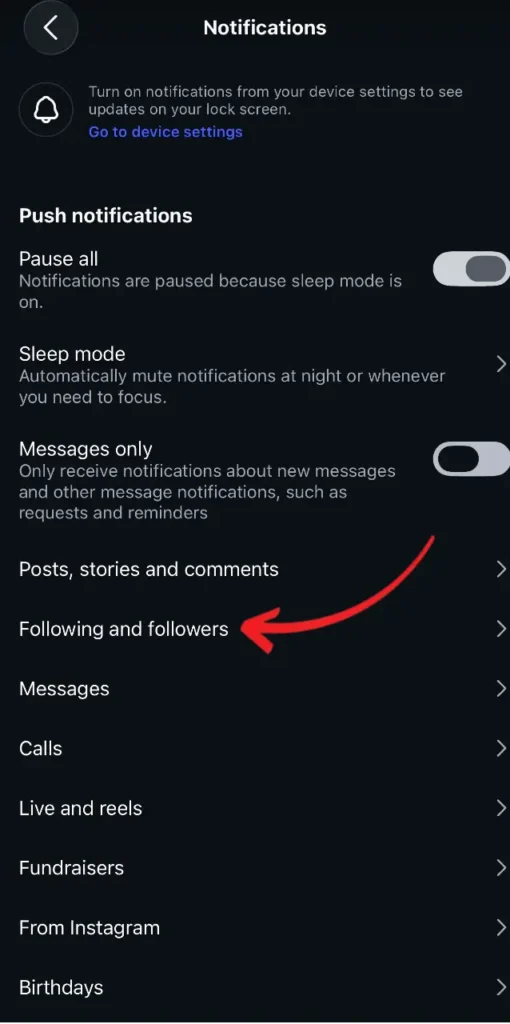
Step 5: Tap Following and Followers
Step 6: Turn off Accepted Follow Requests and Account Suggestions
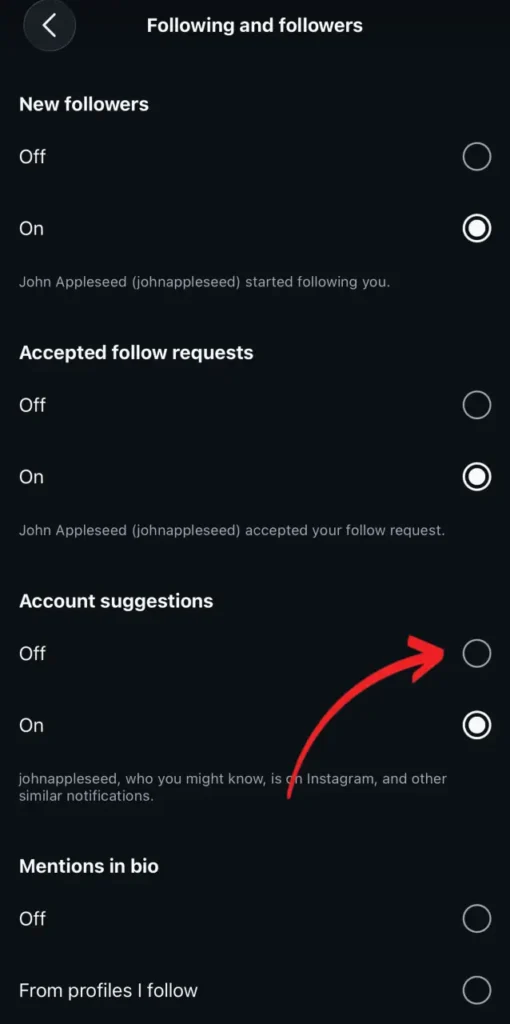
Turning these settings off would stop the push notifications in your regular notification section about follow suggestions, such as You may want to follow this user and so on. However, it would not stop the entire follow suggestion on your profile, and you would still be able to see some account suggestions to follow on your profile.
How to Hide Suggested Accounts in Your Feed
If you are annoyed with account suggestions in between the posts on your feed, you can follow these steps to hide those suggestions and reduce similar suggestions in the future:
- Tap the three dots at the top right of the suggested post or account
- Tap on Not Interested so that Instagram hides the suggested account or post and will not suggest similar posts or accounts in the future
- Follow the same steps for all the posts and accounts that you don’t want to appear on your feed
These steps would help you reduce the number of suggested content and profiles on your feed.
How to Stop Your Account From Being Suggested to Others
Instagram also allows you to control the settings of your account being suggested to other users. If you do not want your account to be suggested to other users, you can simply turn it off through the following steps:
Step 1: Open Instagram’s website in a web browser and sign in to your account
Step 2: Click on the profile icon or your profile picture
Step 3: Click the Edit Profile option to make changes to your profile
Step 4: Scroll down and uncheck Show account suggestions on profiles to turn it off
Step 5: Save the changes to the profile by clicking the Submit button
This option is only available on the web version of Instagram, and it’s not possible to change this setting using Instagram’s mobile app. Hence, you must sign into your account from a web browser to turn on or turn off this feature.
Additional Ways to Reduce Recommendations
You can further reduce account suggestions and recommendations from Instagram based on your activities and contacts syncing. Follow these steps to reduce account suggestions on your profile:
- If you do not want contact-based suggestions, turn off the sync contacts option and remove already synced contacts
- View the posts or reels of the accounts that you follow only from the Following feed tab
- Click on the three dots at the top right of the posts to snooze suggested content.
Conclusion
Although Instagram does not provide you with a direct setting to turn off suggested accounts and content on your profile and feed, you can still reduce the same by following a few easy steps as mentioned in this post. You can turn off the follow suggestions’ notifications on your account directly from the notifications settings on Instagram. Instagram also allows you to turn on or turn off your account from being suggested to other users by logging in to your account from a web browser. You can also indirectly reduce the posts and accounts recommendations on your feed through the snooze and not interested options for individual posts and accounts. All these steps would help you experience a clean Instagram feed with no distractions.
1 thought on “How to Turn Off Follow Suggestions on Instagram”