

Snapchat is a widely used social media platform, popularly known for sharing snaps with friends, unlike other social media platforms. As users shares real time updates on Snapchat with their friends, it is very important for them to add users whom they want their updates to be seen by on their friend list. One way of discovering and adding known friends on Snapchat is through mutual friends, so you would end up adding individuals you may actually know. If you want to avoid adding unknown to your friend list, mutual friends on your friend’s account would be very helpful for the same.
In this article, we provide information on how to see mutual friends on your friends’ list on Snapchat to refrain from adding unknown users to your friend list and sharing your snaps, along with a step-by-step process for the same.
Why Check Mutual Friends on Snapchat
We are very much into sharing our live updates with our friends on Snapchat, and for privacy reasons, some users don’t want them to be seen by unknown users. It is important to know your friends connected with that individual to better understand your snap sending friends. In addition to this, there are also various other reasons why you may want to check mutual friends on Snapchat, such as: Understanding mutual friends helps you:
- Mutual friends help you identify known friends before adding someone as your friend
- You can have your shared social circles for a group of known users
- Mutual friends avoid accidentally adding strangers to their Snapchat profiles
- The mutual friends option is a quick and effective way of discovering people you might know
Methods to See Mutual Friends on Snapchat
You may want to see mutual friends on someone’s profile on Snapchat to see if you know that user. Snapchat helps you see the number of mutual friends on the friend list of a user, if any. There are various ways in which you can check the mutual friends on Snapchat. You can try the following methods to check for mutual friends:
Check Mutual Friends Through the “Quick Add” Section
The fastest way to add someone as your friend is the Quick Add Section on Snapchat. Snapchat generally shows the users you may actually know based on your friends to add to your friends list in the quick add section. Follow these steps to check the mutual friends in the Quick Add on Snapchat:
Step 1: Open the Snapchat app on your phone and log in to your account
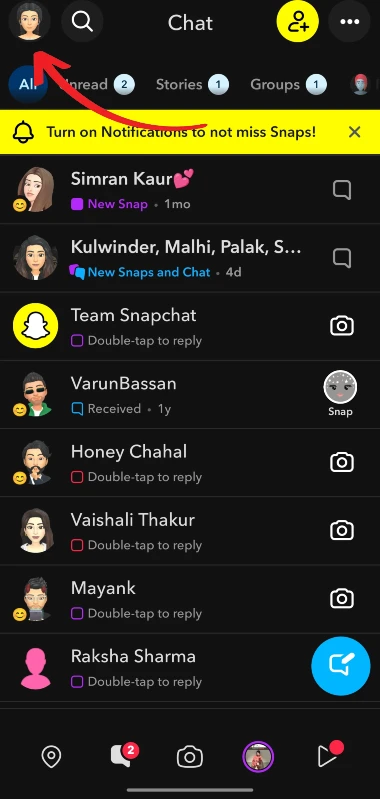
Step 2: Tap on the profile icon or your Bitmoji in the top-left corner
Step 3: Scroll down Friends and Add Friends to see friends in Quick Add
Step 4: Look for users who show “X Mutual Friends” under them, where X means the number
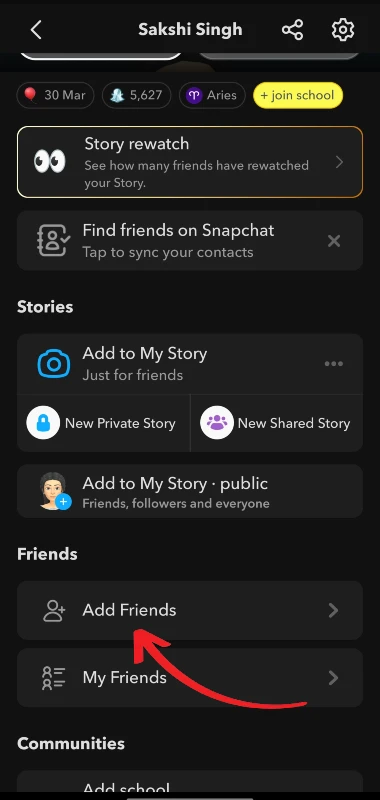
If you are not able to see the number of mutual friends, it can either be that there are no mutual friends in their friend list, or the other user may have restricted their privacy settings for friends.
View Mutual Friends From a User’s Profile
Another way of seeing mutual friends in someone’s Snapchat account is from their profile page. You can view the profile of the user by searching for them or from the suggestions that are provided automatically by Snapchat. You can see the number of connected friendsthat you are also connected to in the following steps:
Step 1: Open the Snapchat app on your device and log in to your account
Step 2: Tap on the Search bar at the top and search to find the user
Step 3: Tap on the profile of the user from the search results
Step 4: You may then see the number of mutual friends that are connected to them on their friend list
Understand When Mutual Friends Won’t Show
Snapchat doesn’t show the names of the mutual friends on someone’s profile; it only shows the number of mutual friends in number. There are instances where you may not be able to see mutual friends on Snapchat, and they may be for various reasons, such as:
- The user has hidden their friend list by enabling privacy settings for the same
- You and the user may not have a common friend in the friend list as of now
- Snapchat doesn’t show mutual friends for some accounts because of its algorithm
- Some of the account shows mutual friends information only in the Quick Add section and not the profile
- The user may be unknown to you and your friends
Increase Chances of Seeing Mutual Friends
As we have discussed, there are times when Snapchat doesn’t show you the number of mutual friends in someone else’s account. However, you can increase the chances of seeing a mutual friend in their profile. Follow these important tips for the same.
- Check your friend list regularly and keep your friend list updated
- Try adding people you know in real life to avoid adding unknown users
- Get better friend suggestions by enabling Contact Syncing, which is an optional step
- Snapchat’s algorithm may not work effectively for inactive accounts. Try keeping your profile active
Conclusion
In the methods mentioned in this post, you can easily check the number of mutual friends in someone’s Snapchat account. The same list may sometimes not be updated, however you can get it resolved easily with quick tips. It is worth noting that Snapchat only shows you the number of mutual friends in your account or the user’s account, and not the names of the users in that list. This is a very useful feature to keep your account safe and maintain privacy, so that you can freely post your stories and streaks.