

Snapchat’s story hiding feature is a very important feature that allows users to hide their Snapchat stories from certain users, as they are not meant to be seen by them. Hiding the story from them is one best solutions when you want some of your stories private and refrain users whom you don’t want to see the stories from seeing them, and Snapchat gives you control over who can see your Stories.
In this article, we have provided the steps to hide and unhide Stories on Snapchat to prevent certain users from viewing your stories on Instagram in a quick and easy guide, along with the step-by-step process for the same.
Why Hide a Story on Snapchat
There may be various reasons for you to consider hiding your Snapchat stories from various users, and the reasons vary from person to person. However, most people hide their stories for these common reasons:
- Privacy: You want only your trusted friends to see your stories
- Control: Get a control on who sees your daily updates and remove the ones you don’t want to
- Customization: Make a clear differentiation between your public audiences and private audiences
- Peace of mind: You have added someone as your friend and don’t want them to see your updates without removing them as friends
Things to Remember Before Hiding a Story on Snapchat
You may choose to hide your Snapchat story from various users to maintain your privacy. Stories on Snapchat updates the friends and followers with your activities, and you may not want some users to see the same. Hiding your story becomes the most important thing; in this case, you need to keep in mind various things before hiding your Snapchat story.
- The story would only be hidden while normal snaps would still be visible if sent
- You can hide only one story or all the stories on Snapchat
- You can hide a story without blocking or removing the user from your friend list
- If your story is public, users may still be able to see it through an external app or website
Methods to Hide a Story from Someone on Snapchat
You may want to hide your story on Snapchat from some users only while making it viewable to other users, and you do not want to block them or unfriend them. This is why you need to hide the story so that they won’t be able to see it. There are two main ways to hide a Snapchat Story: through Story Settings and While Uploading a Story.
Hide a Story Using Story Settings
Step 1: Open the Snapchat app on your mobile
Step 2: Tap on your Bitmoji (profile icon) in the top-left corner
Step 3: Tap Settings (gear icon) in the top-right corner
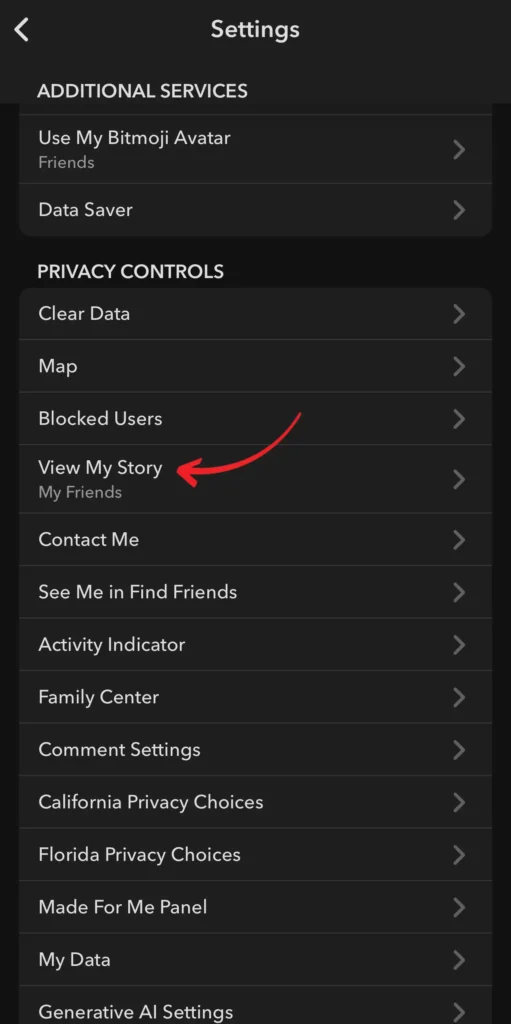
Step 4: Go to Who Can… and select View My Story from the options or scroll down to View My Story under Privacy Controls and tap on it
Step 5: Tap on Custom
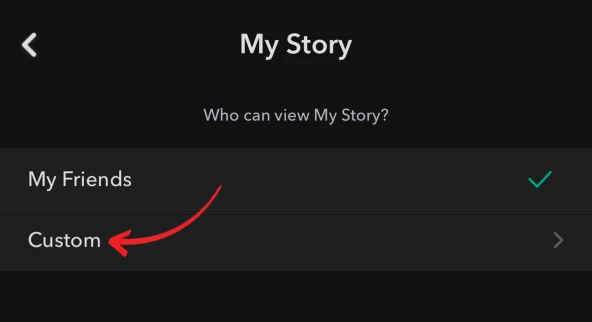
Step 6: Choose the friends you want to hide your Story from and confirm
Note: The users would not know that you have hidden your story from them.
Hide a Story Directly While Posting
Step 1: Create a Snap you want to share as a Story or select one from your Memories
Step 2: Tap the Send To button
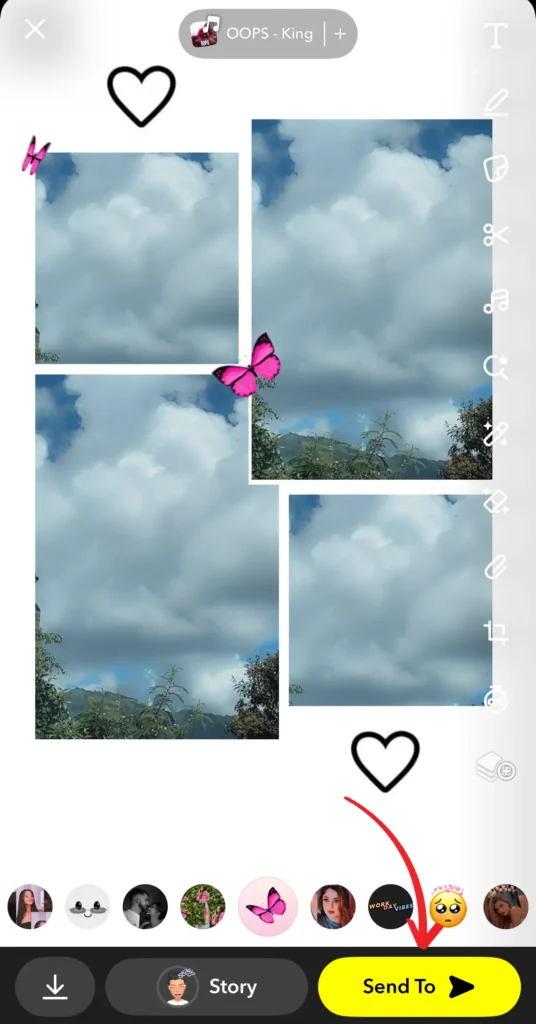
Step 3: Select My Story, and tap the three dots on the left of it
On some devices, you can create a new list by clicking on the New button to select Users to show your Stories
Step 4: Choose Custom and select the users whom you want to hide your Story (on some devices, select Friends Only instead of Public)
Step 5: Post your Story
Your story would be hidden from the users whom you have selected in the previous step. However, if you have selected Friends Only, it would be shown to your friends but hidden from the public.
Note: This method works best when you want to hide Stories, sometimes only without changing your general Story settings.
How to Unhide a Story on Snapchat
If you later want to let users from the hidden list see your Stories again, you can remove them from the list in quick, simple steps.
Step 1: Go to Settings from your profile page (Bitmoji icon)
Step 2: Scroll down and tap View My Story
Step 3: Select the option as per your preference: Everyone, Friends Only, or edit your Custom list
Step 4: The hidden person removed from the list will now be able to see your Stories again
Conclusion
Hiding a Story on Snapchat is a useful feature by Snapchat to give you control over your privacy and security. You are the only one who decides who sees your content, whether it be just the story or all stories from the settings page or the individual story page. The hide story feature is reversible and can unhide your stories when you no longer want to hide them from the users in just a few clicks. The changes would be applied to the stories posted after the changes and not to the stories that are already posted or shared.