
Getting your account verified on Instagram means having the blue tick mark after your Instagram username, suggesting that your account is original, authentic, notable, and trustworthy for the users. It ultimately helps in boosting the credibility of your account, increasing the reach and visibility of your content, and protecting your profile from impersonation. Whether you’re an individual, professional creator, public figure, or business, you can get your account verified on Instagram. You can apply for your account verification in quick and simple steps from either of the two simple methods.
In this article, we provide the best and easiest ways to get verified on Instagram to make your account look original and authentic, so that fake accounts can be filtered with a blue tick on your account, along with a step-by-step process for the same.
Why is Instagram Account Verification Important
Verification of your Instagram account helps you to make your account grow faster with better reach and engagement. An Instagram blue tick helps your account in various ways, such as:
- Verified accounts build trust with your audience and followers
- Instagram verified account distinguishes your account from fake profiles
- If your account is blue tick verified, Instagram boosts discoverability in search page and recommendations
- Verified account adds credibility for influencers, brands, and professionals
- It increases the reach of your content to help you grow faster
To sum it up, getting verified means that your account is original and authentic, which ultimately states that your online presence and your content are trustworthy.
How to Get Blue Tick Verification on Instagram
Individuals, content creators, businesses, and public figures can get their Instagram accounts verified by applying for the blue tick verification. You can apply for the account verification once your account meets the eligibility criteria and you have valid identification proof for the same.
I have listed the methods for account verification along with the simple steps and procedures below in this article.
Methods to Get Verified on Instagram
You can get your account verified on Instagram with the help of either of the two methods. However, your account needs to be eligible for verification for both methods, along with a valid identification document.
1. Request Verification Through Instagram Settings
One of the two methods for applying for account verification is through the Instagram settings, which is simple and easy for everyone. Follow the steps mentioned below to request your account verification:
Step 1: Open the Instagram app on your phone and log in to your account
Step 2: Tap on the Menu (☰) icon in the top right corner to go to your profile
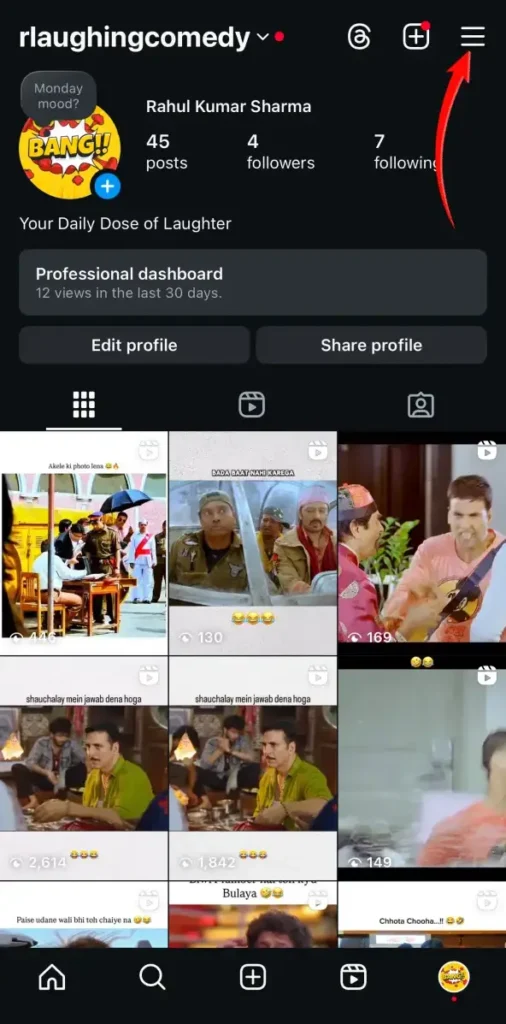
Step 3: Tap on Settings and privacy or Creator Tools and Controls as per your account
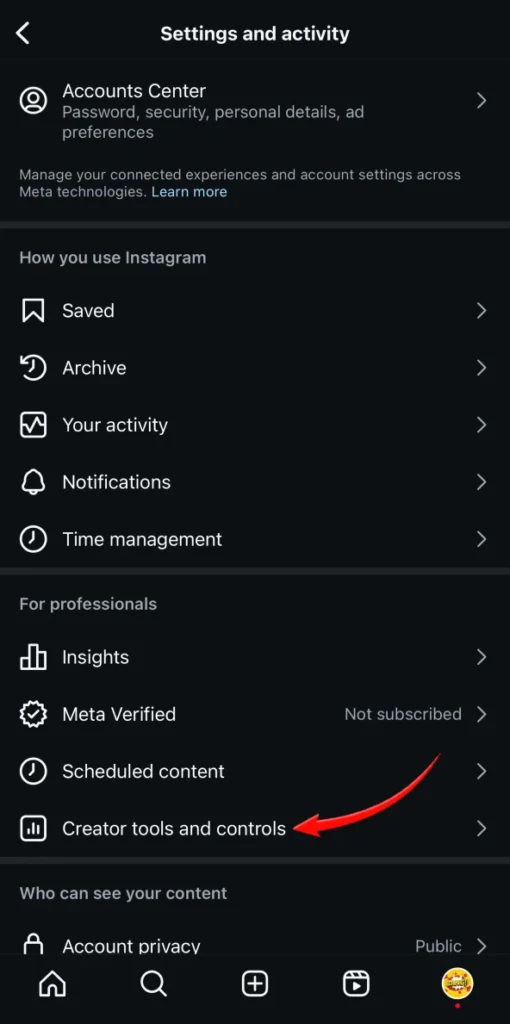
Step 4: Select Account and then Request Verification or under creator tool tap on request Verification
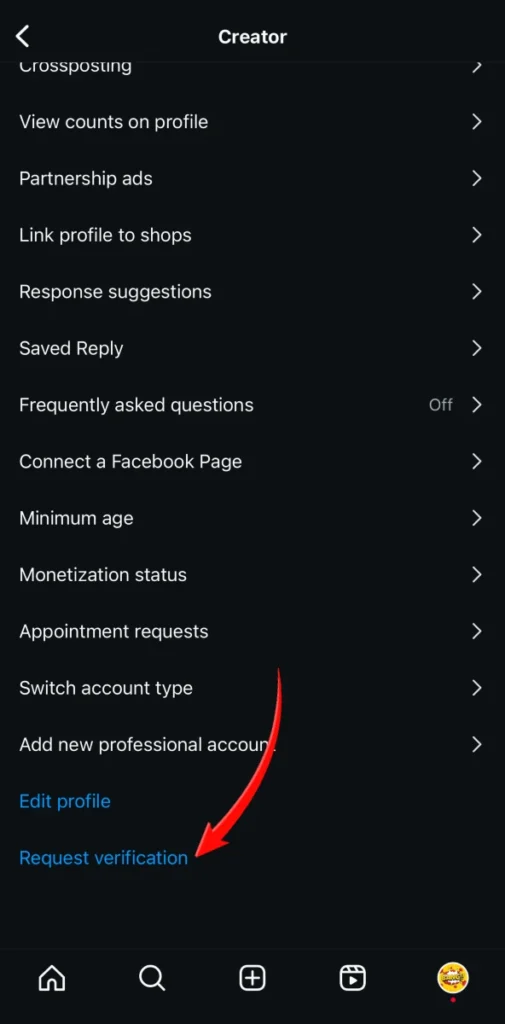
Step 5: Fill out the form that is available with the required details such as full name, knows as (public name), category, governement issued identity
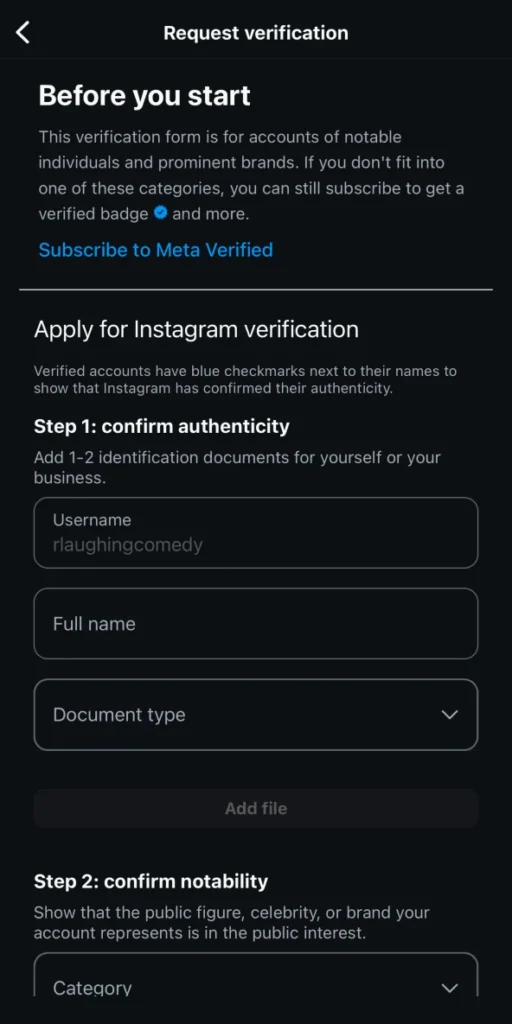
Step 6: Submit the form to make your request for verification
Note: Private accounts can’t be verified, hence ensure that your account is public and your profile is completed with a profile picture, bio, and at least one post before applying.
2. Subscribe to Meta Verified
You can also get your account verified through Meta Verified Subscription, which is a paid verification service offered by Meta in selected countries. Follow the steps to get your account meta verified:
Step 1: Open the Instagram app and log in to the account you want verified
Step 2: Tap on the Menu (☰) icon in the top right corner to go to your profile
Step 3: Tap on Settings and privacy or Meta Verified as per your account
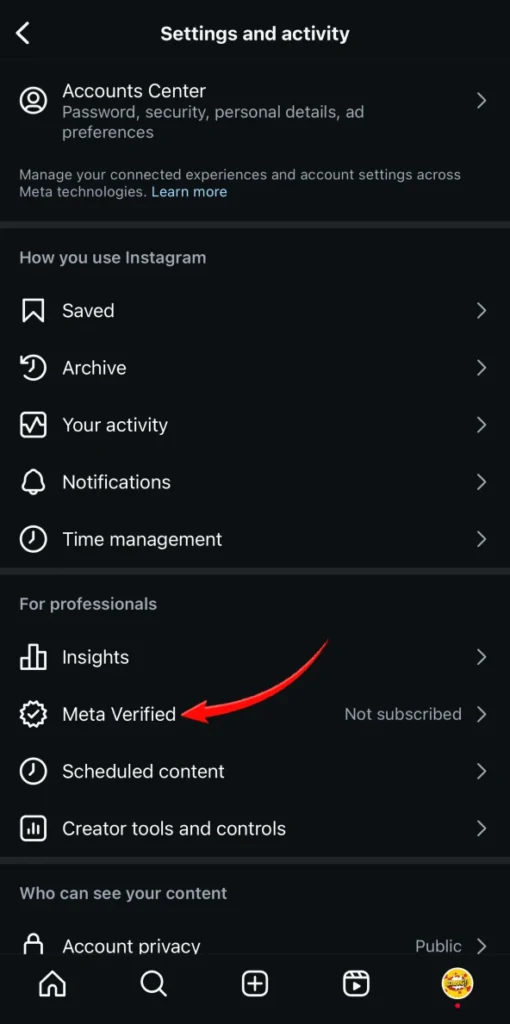
Step 4: Follow the instructions on the next screen to begin your application process
Step 5: Confirm your identity using a valid government-issued identity card
Step 6: Enable two-factor authentication for your account
Step 7: Subscribe to Meta Verified Subscription. You need to pay a monthly subscription fee for the same
Note: Meta Verified Subscription not only offers blue tick verification for your account but also provides account support and helps you protect your account from impersonation.
Conclusion
Instagram allows you to get your account verified through two different methods, one being the free method after qualifying the eligibility criteria, and the other being the paid one with Meta Verified Subscription. For the paid subscription plan, you don’t have to meet any eligibility criteria, but your account has to be completed along with one or more posts. For the free verification, you need to have an optimized account and must be authentic. Paid Verification is faster than the free one. Having your Instagram account verified helps you to build trust in your account among your followers, as it states the originality of your account, and fake profiles on Instagram with your name can be identified and filtered.