

Are you also looking to flex your Instagram text style on stories and posts with the trending and new font options of Instagram? Instagram’s new update provides new fonts, text animations, and effects for your Instagram Reels and Stories. You can customize your content better using the latest font options on Instagram and make your content stand out. We would also provide the steps to access the new fonts if they are not available on your Instagram account, along with the best uses for the same.
In this article, we provide how to get the new Instagram Fonts, text animations, and effects to make your content on Instagram attractive and engaging to your followers, along with a step-by-step process for the same.
Why Update Your Fonts on Instagram
Using the new and updated fonts on Instagram provides Instagram users with numerous opportunities and benefits. These are the reasons why you should update and use the new fonts on Instagram:
- Get new font styles for Stories, Reels, and Posts for more creative options.
- It helps in better branding of your account with the use of unique fonts to make your profile look more polished and on-brand.
- You can use the updated and stylish fonts conveniently, directly in the Instagram app itself, without using any third-party tools.
- Stylish fonts help your content reach a larger audience by grabbing the attention of the viewers in your feed and stories.
Methods to Get and Use the New Instagram Fonts
There are two main ways in which you can update, find, and use the latest Instagram font options. Check out how you can make your content on Instagram better with Instagram’s latest font options.
Ensure Your Instagram App is Updated
The first step to using the latest fonts on Instagram is to make sure you are using the latest version of the Instagram app by updating it. You can update your Instagram app by following the steps mentioned below:
Step 1: Open the Google Play Store or App Store on your phone.
Step 2: Search for Instagram and check if an update is available.
Step 3: Tap Update to install the latest version of the app.
Access the Font Selection in Stories or Reels
Use the latest fonts in your Instagram Stories and Reels from the Instagram app itself while editing your content.
Step 1: Open the Instagram app on your device and click on the +( plus) icon for creating a Story or Reel.
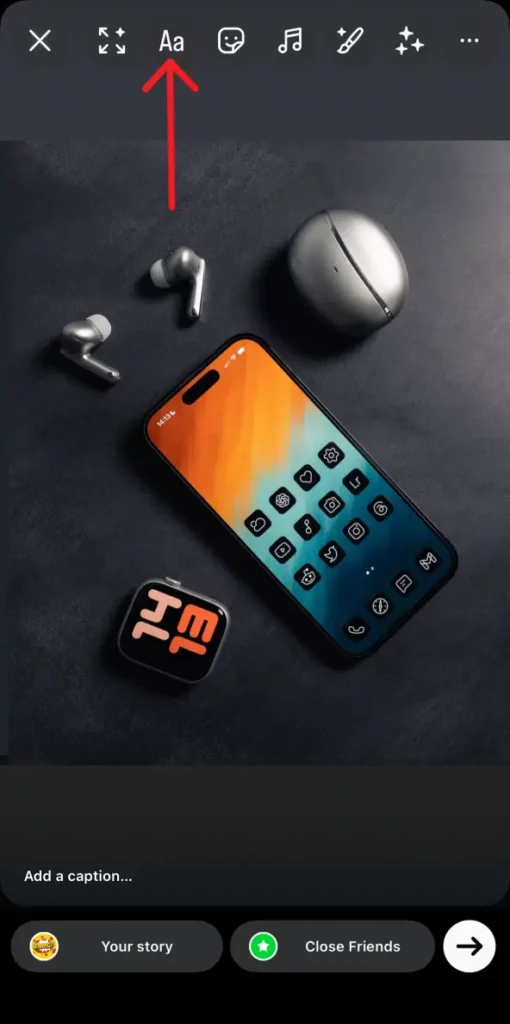
Step 2: Tap the add text Aa icon to open the edit text tool option.
Step 3: Type the desired text. You’ll see different font options on the screen.
Step 4: Check out the different font previews like Signature, Editor, Bubble, Deco, Poster, Squeeze, and Rosalia.
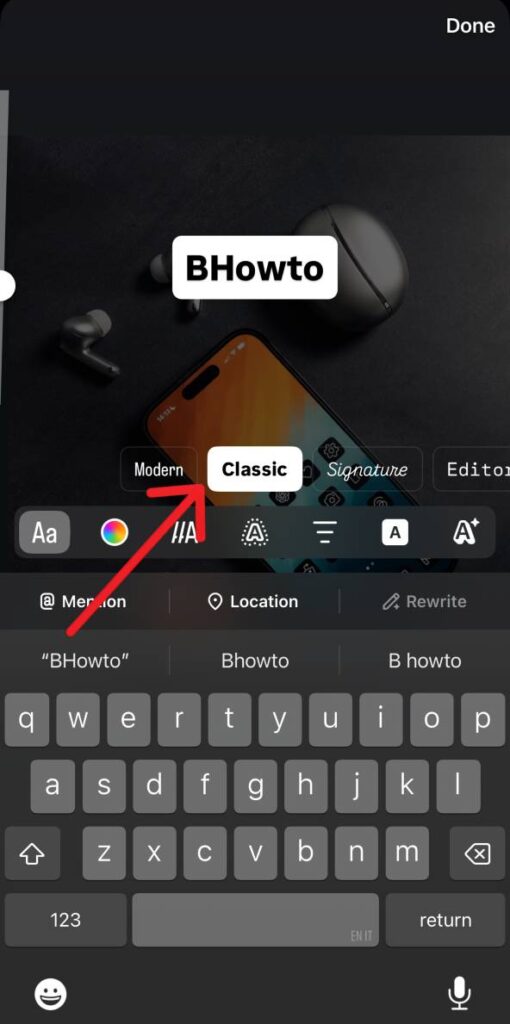
Step 5: Choose your preferred font style from the options and edit the text style, like adjust color and animation.
Step 6: After making the changes, tap on Done.
Use Custom Text Generators or External Apps
If you still don’t have the latest font options on Instagram, then you must try using third-party apps to get the latest fonts for your Instagram stories and reels. Follow these steps to get the new fonts for your Instagram content:
Step 1: Visit any Instagram font generator website available on the internet.
Step 2: Check the different font previews by typing your text.
Step 3: Copy your text in the desired font style.
Step 4: Paste the copied text into your Instagram bio, caption, or Story for a stylish effect.
What to do If You Still Don’t See New Fonts
If you still can’t see the new Instagram fonts even after the above three methods, then you must try the followring trouble shooting tips:
- Log out of your Instagram account and log back in again.
- Clear the cache of the app or uninstall the app and install back.
- Make sure your phone’s date is accurate and up to date.
- Update your Instagram app, or wait for a few days until the update is available.
- Use any third-party font generator tool to get the desired result.
Conclusion
Instagram introduced new fonts to make your content look cool and attractive, but this works only with the posts, reels, or stories. Updating your Instagram app would help you get the latest fonts on Instagram most of the time. It is simple and easy to get the new Instagram fonts from the Instagram app itself for your Stories and Reels. If the new fonts don’t work directly from the app, you should try using third party font generator tool to use the stylish fonts for your Instagram posts’ captions and account bio. The updated fonts work the best to make your content stand out and make it effective.
Hand-drawn charcoal drawing portrait of the uploaded image. Traditional art medium, expressive, professional-grade illustration. Use rich, deep, and velvety charcoal shading with smooth transitions achieved through blending, from intense, dark compressed charcoal blacks to soft, powdery light gray tones. Emphasize expressive, bold, and dynamic charcoal strokes. Realistic texture of charcoal dust and smudge marks on slightly textured, off-white drawing paper. High fidelity on eyes, lips, and nose. Textured, voluminous hair. Dramatic, high-contrast lighting creating deep shadows and stark highlights. Simple, muted background that gently fades into the paper.
Generate a hand-drawn portrait illustration in red and yellow pen on notebook paper, inspired by doodle art and comic annotations. Keep full likeness of the subject, expressive lines, spontaneous gestures, bold outline glow, handwritten notes around, realistic pen stroke texture, 4K resolution.
Hand-drawn style sketches and paintings have been trending on the internet these days as it looks so natural, clean and sophisticated to see. Users are drawn by the realistic looking hand-drawn style sketches and you don’t need to be a good artist make one for yourself. Infact, you can create multiple hand-drawn style sketches without even a pencil, all you need is your image and a good prompt. Google Gemini AI image generation helps you create creative images with just a simple prompt.