

Instagram is one of the most popularly used social media platforms used for scrolling reels, connecting with friends and engaging with our favourite creators. You would need an Instagram account to make use of these amazing features of Instagram, and if you don’t already have an account, you may be looking to create one. If you’re trying to create a new account on Instagram but are constantly facing errors, then you are not the only one facing the issue. Many users face issues while trying to sign up for Instagram for various reasons, such as technical restrictions, policy limits, or simple mistakes.
This guide explains the most common reasons why you can’t create an Instagram account and what you can do to fix them.
In this article, we have provided the most common reasons why you can’t create an Instagram account and sign up on Instagram, along with the steps to fix the issues and create an account in a quick and easy guide, along with the step-by-step process for the same.
Common Reasons Why You Can’t Create an Instagram Account
There are various reasons why you can’t sign up for Instagram and create an account, such as technical issues, policy restrictions, mistakes while filling out the sign-up form, providing inaccurate information and so on. The common reasons why you can’t create an account on Instagram are:
You’re Using an Email or Phone Number Already Linked to Another Account
Instagram allows only one account to be linked to one phone number or email, and not more than one account can be associated with one mobile number or email. This is the prime reason why a user faces issues and errors pop up while creating an account on Instagram. If you are facing this issue, you must try the following things to resolve the issue and sign up for Instagram:
- Try a different mobile number that you haven’t used earlier on Instagram.
- Use a different email that has not been previously associated with any account.
- Check if you have already created an account with the same details.
- Recover your account if there is an account already registered with your details.
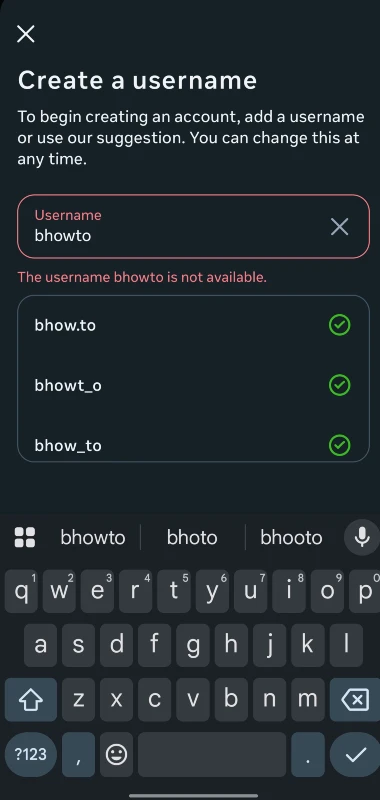
Your Username Is Already Taken
Another common reason for errors while creating an Instagram account is the unavailability of usernames. Instagram doesn’t allow two accounts with the same username, hence you would need a unique username to create your account. You can check for an available username by trying the following tips:
- Add underscores, dots or numbers to your username to make it unique
- Try a different username to represent your name or your brand name
- For example, if @johnsmith is not available, you can try in formats such as @john_smith, @johnsmith1 or @john.smith_1
You’re Creating Too Many Accounts From One Device or IP
Instagram doesn’t allow you to create too many accounts from one device or IP to prevent unusual activity and to abide by the community guidelines on Instagram. You must try the following troubleshooting ideas to resolve your issue:
- Restart your device and try again
- Try creating your account after some time
- Use a different mobile network or wifi and try again
- Do not create multiple accounts in one season
You’re Below the Minimum Age Requirement
In most countries, Instagram doesn’t allow users below 13 years old to create an account. If your age is above 13 years and still facing this issue, try the following things:
- Use the appeal option to contact and resolve your issue
- Avoid using inaccurate or incorrect birthdates
- Add your family member as your supervisor for handling accounts if underage
Your Device or IP Address Is Temporarily Blocked
Instagram generally blocks sign-ups if it detects automated activity, suspicious login patterns, or the use of VPNs to protect and safeguard the interests of its users. If you are encountering this issue, try the following fixes:
- Clear your app’s date and clean the cache
- Uninstall the Instagram app and reinstall it.
- Use a different device to sign up for a new Instagram account
- Turn off your VPN or proxy and try creating your account
Instagram Servers Are Down
The errors and issues on Instagram don’t always occur at your end; sometimes the issue is on Instagram’s side when its servers are down. This is what you can do to resolve the issue:
- Clear the app from the recent apps and open it once again
- Check if other users are also facing similar issues on other devices too
- Restart your device and open the app again.
- Try again after some time
You’re Entering an Invalid or Temporary Email
Instagram blocks sign-ups using trash or disposable email to protect user integrity and fake id issues. You should always use trusted email domains that are real and permanent, such as Gmail, and ensure that you are not using temporary email services for creating your new account.
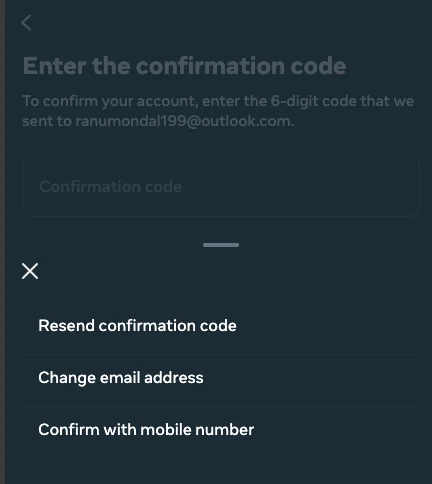
Not Receiving Verification Code
While signing up for an account on Instagram, you are required to verify your contact details, whether phone number or email, with a verification code that would be send on the details provided. If you have provided the correct details and still are not receiving the verificationcode, then you must try again with the following fixes:
- Ensure that the Email or phone number you entered is correct
- Try changing the sign-up method from phone number to Email and vice-versa
- Check the spam or junk folder in your inbox
- Wait for a while and request the code again
App or Browser Glitches
Most of the time, the issue while going on with the sign-up process on Instagram is technical issues of the app or browser, ultimately leading to an error in account creation on Instagram. You can try the following fixes to create your new account on Instagram:
- Update the Instagram app on your phone
- Restart your phone and try the sign-up process again
- Try the account creation process from a web browser instead of the app or vice versa
Your Account Was Previously Disabled
This is a major concern for Instagram as it strictly restricts new sign-ups on Instagram if the details you are using now are linked with the accounts that have been banned or disabled by Instagram. You should try using a different device other than the one on which the account was disabled earlier, and use different credentials for sign-up.
Conclusion
There may be various reasons for you not being able to create an Instagram account, such as an email or number linked to another account, the details linked with an account that has been disabled by Instagram, or your account not following the Instagram policies. In addition to this, there may be some other reasons, like blocked IP, app glitches, that may also lead to errors in the account creation process. You can try the fixes listed above in this post, after which you will be easily able to solve the error and sign up on Instagram seamlessly. If you still keep encountering the issue, you can wait for a few hours or try from a different device to sign up and create a new account on Instagram. These would definitely help in this case.
Password
Account hacked
Instagram
Please account come back